


What Does a UI/UX Designer Do?
Let’s clear up the basics first, because a lot of freshers confuse UI and UX or think they’re interchangeable.
UX (User Experience) is about how something works. It’s the research, the problem-solving, the flow of an app or website, and whether a user can actually accomplish what they came to do without getting frustrated. Think of it as the invisible skeleton behind every screen you use.
UI (User Interface) is about how something looks and feels. Colors, typography, buttons, spacing, icons the visual language that makes an app feel polished, trustworthy, and easy on the eyes.
A good UI/UX designer moves comfortably between both. You’re part researcher, part problem-solver, part visual storyteller. Some days you’re interviewing users to understand their pain points; other days you’re pixel-pushing a button state in Figma. That variety is honestly one of the best things about this career no two days look the same. If you’re looking for a UI UX design course and want to become a UI/UX designer in 2026, this roadmap will help you understand where to start. From learning design fundamentals and Figma to building real projects, creating a strong portfolio, and preparing for interviews, you’ll find a clear path designed especially for freshers.
Why Start a UI UX Design Course in 2026?
There’s a lot of noise online about AI “replacing” designers. Here’s the honest picture: AI tools can now generate wireframes, suggest color palettes, and even mock up entire screens in seconds. What they can’t do is understand why a particular flow frustrates a first-time user, or make the judgment call between two equally “correct” designs based on business context and human behavior. That’s still deeply human work.
What’s actually happening is that the role is evolving. Companies now expect designers to know how to work alongside AI tools to move faster, not to be replaced by them. Freshers who learn to use AI as a co-pilot for research synthesis, rapid prototyping, or content generation while keeping their design thinking sharp are the ones standing out in interviews right now. That’s a real shift from even two or three years ago, and it’s worth building into your learning plan from day one rather than treating it as an afterthought.
Add to that the sheer number of digital products being built every startup, every local business, every government initiative now needs an app or a website that doesn’t feel clunky. Demand for design talent hasn’t slowed down; it’s just gotten more specific about what “good” looks like.
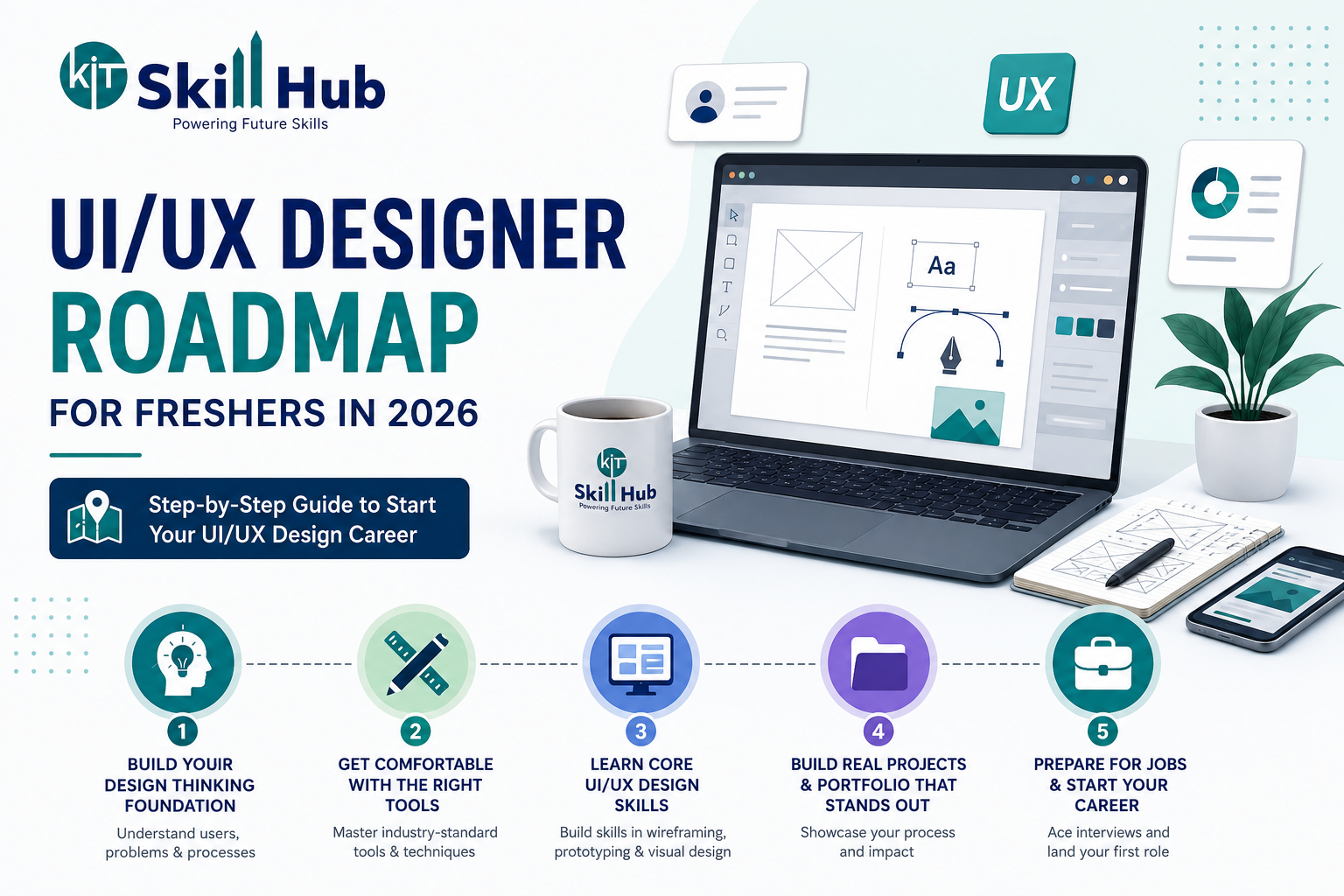
Step 1: Build Your Design Thinking Foundation
Before you open any software, spend time understanding how designers think. This is the part freshers love to skip, and it’s the part that separates someone who can use Figma from someone who can actually solve a design problem.
Learn the basics of:
- Design thinking process empathize, define, ideate, prototype, test
- User research fundamentals interviews, surveys, personas, journey maps
- Information architecture how content and features get organized so users don’t get lost
- Usability principles Nielsen’s heuristics are a great starting point
You don’t need to memorize textbooks here. You need to internalize the mindset: design exists to solve a real problem for a real person, not to look pretty for its own sake.
Step 2: Learn UI UX Design Tools
Once the thinking is in place, tools become your language for expressing it. Here’s what freshers should prioritize learning, roughly in order:
- Figma: the industry-standard design and prototyping tool. If you learn only one tool well, make it this one.
- Wireframing basics: low-fidelity sketching, either on paper or in Figma, to rapidly test ideas before investing time in visuals.
- Prototyping: connecting screens together so stakeholders and users can click through a flow like it’s a real app.
- Collaboration tools: Notion, Miro, and similar tools for organizing research, workshops, and team collaboration.
- AI-assisted design tools: increasingly used for generating first-draft layouts, writing UX copy, and speeding up repetitive tasks like creating design variations.
A structured UI/UX design course typically walks you through all of these tools hands-on, in the context of real projects, rather than leaving you to figure out fifteen YouTube tutorials on your own. That structure matters more than people expect — it’s the difference between knowing a tool exists and actually being fluent enough to use it under time pressure.
Step 3: Learn Visual Design Fundamentals
This is where UI really comes alive. Even if you’re not going to be a full-time visual designer, freshers need a solid grip on:
- Typography: hierarchy, readability, pairing fonts
- Color theory: contrast, accessibility, emotional impact of color choices
- Layout and grid systems: how spacing and alignment create visual order
- Design systems: reusable components that keep large products consistent
If this section feels intimidating, it shouldn’t. These are learnable, teachable skills not innate talent. Anyone who tells you design is “something you’re either born with or not” hasn’t actually taught it before.
Step 4: Practice on Real (or Real-ish) Projects
Here’s the uncomfortable truth: tutorials alone won’t get you hired. Recruiters and hiring managers want to see how you think through an actual problem, not how well you followed a step-by-step video.
Ways to get real practice as a fresher:
- Redesign an app you use daily and are frustrated with document your reasoning, not just the final screens
- Take on freelance micro-projects for local businesses (even for free, early on) to get exposure to real client feedback and deadlines
- Participate in design challenges or hackathons
- Join a course that includes live client-style projects, so you’re solving problems with actual constraints and stakeholder feedback rather than a hypothetical brief
This last point is where structured programs genuinely pull ahead of self-taught paths. A good UI/UX design course builds real, portfolio-ready projects into the curriculum, so you graduate with tangible proof of your skills not just a certificate.
Step 5: Build a UI/UX Design Portfolio
Your portfolio is your resume, your interview pitch, and your proof of skill, all rolled into one. Freshers often make the mistake of showing only polished final screens. What hiring managers actually want to see is your process:
- What was the problem?
- What research or assumptions informed your approach?
- What alternatives did you consider and reject?
- How did the final design solve the original problem?
Three to five well-documented case studies will always beat fifteen shallow ones. Quality of thinking, not quantity of screens, is what gets you shortlisted.
Step 6: Prepare for Interviews and Job Applications
Once your portfolio is ready, shift focus to:
- Resume and LinkedIn: tailored specifically to design roles, with keywords recruiters actually search for
- Mock interviews: practicing how you talk through your design decisions out loud, since this is exactly what design interviews test
- Portfolio walkthroughs: being able to present a project clearly in under five minutes
- Networking: reaching out to designers on LinkedIn, attending local meetups, and building genuine connections rather than cold-applying only
Career coaching, resume support, and mock interview practice are things a good training program should offer alongside the technical curriculum. Landing that first job is as much about presentation and confidence as it is about design skill and most freshers underestimate how much of a difference structured interview prep makes.
Why Choose a UI UX Design Course?
Self-teaching is absolutely possible there’s no shortage of free resources online. But most freshers who try the self-taught route hit the same wall: they learn tools in isolation, without a structured path connecting design thinking to visual execution to a real, defensible portfolio. It’s easy to spend months bouncing between YouTube channels and still not feel “job ready.”
A well-designed UI/UX design course solves this by giving you:
- A structured, sequential curriculum instead of scattered tutorials
- Hands-on projects with real or client-style briefs
- Mentorship from people already working in the industry
- Portfolio-building support baked into the course, not left to chance
- Internship exposure, so you walk into interviews having already worked in a team setting
- Career coaching and placement assistance for that crucial first job
At KIT Skill Hub, the UI/UX Design Program is built around exactly this philosophy practical, project-driven learning with tools like Figma, real client-style assignments, and structured career support, delivered through offline batches at the Gachibowli and Ameerpet campuses in Hyderabad as well as live online sessions for learners elsewhere. The program is designed specifically for freshers and career switchers who want a genuine, guided path into design rather than a scattered, self-taught one including how to use AI tools effectively as part of the modern design workflow, so you’re not just job-ready today but adaptable to where the field is heading.
Common Mistakes Freshers Should Avoid
A few things worth watching out for as you start this journey:
- Tool-hopping without purpose jumping between five different design tools instead of mastering one deeply
- Skipping research and jumping straight to visuals pretty screens with no problem-solving behind them rarely impress experienced interviewers
- Copying trending UI styles without understanding why they work trends fade; principles don’t
- Building a portfolio of unrelated practice shots instead of a few deep, well-reasoned case studies
- Ignoring accessibility inclusive design is no longer optional, and interviewers increasingly ask about it directly
Final Thoughts
Becoming a UI/UX designer in 2026 isn’t about chasing the flashiest tool or memorizing every design trend on Pinterest. It’s about building a genuine problem-solving mindset, getting comfortable with the tools of the trade, practicing on real projects, and presenting your work with confidence. The freshers who succeed fastest are usually the ones who follow a structured path instead of piecing things together randomly and that’s exactly what a good UI/UX design course is meant to provide.
If you’re serious about starting this journey with proper mentorship, real projects, and placement support behind you, it’s worth exploring what a dedicated design program can offer rather than trying to figure it all out alone.
FAQ’S
Q1. Do I need a design degree to become a UI/UX designer?
No. Most successful UI/UX designers today come from diverse educational backgrounds engineering, commerce, psychology, even the arts. What matters more is a strong portfolio and demonstrated design thinking.
Q2. Is coding necessary for UI/UX design?
Not required. UI/UX design centers on design thinking, research, wireframing, and prototyping using tools like Figma. Basic familiarity with how developers implement designs can help you collaborate better, but it isn’t mandatory to get started.
Q3. How long does it take to become job-ready in UI/UX design?
With focused, structured learning, most freshers can build a solid portfolio and become job-ready within a few months, depending on the pace and depth of the program.
Q4. Will AI replace UI/UX designers?
AI can speed up repetitive parts of the workflow, like generating first-draft layouts or research summaries, but it can’t replace human empathy, judgment, and creative problem-solving — the core of what makes design effective.
Q5. What tools should a UI/UX fresher learn first?
Start with Figma for design and prototyping, alongside basic wireframing and collaboration tools like Miro or Notion. Build from there as your projects get more complex.
Ready to Start?
If you’re still unsure which format fits your goals, our team can walk you through it based on your background and career target no pressure, just a clear picture of what would actually work for you.
📌 Book a free demo class at KIT Skill Hub, Gachibowli or Ameerpet, and experience the hybrid model firsthand.
[Explore our courses →] | [See our placed candidates →] | [Book a Free Consultation →]